

 Español
 한국어
 Русский
 हिन्दी
 Português
 Türkçe
 Tiếng Việt
 Italiano
 Français
 日本語

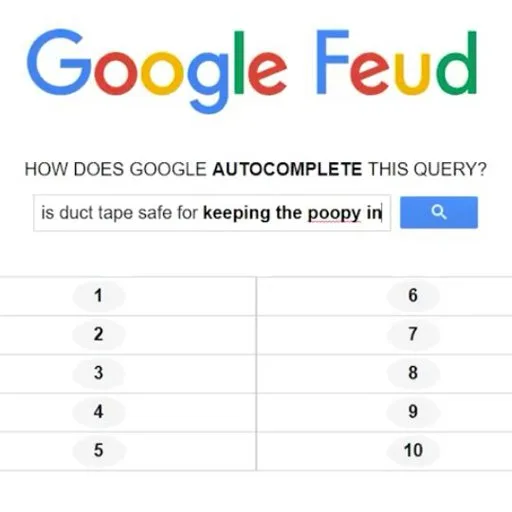
Google Feud: guess what Google autocompletes
About Google Feud
Google Feud is a guessing game based on search autocomplete: you are given the start of a search and must guess how people complete it. The goal is to hit the most popular suggestions to score points.
What makes it fun is that there are no textbook "right" answers, only what people actually search for, so you have to think like the rest of the internet: what they ask, what they compare, what makes them curious. Every round is a small surprise and often ends in laughs when you see what the search engine suggests.
It is a single-player game, though it works great in a group, passing the keyboard around or shouting out guesses. You play in a desktop browser with no download or sign-up, and its description presents it as the world's most popular autocomplete game.
It is also a curious way to discover what worries, intrigues and amuses people when they search the web. Rounds are short, so you can play one on a break or chain several if you want to beat your own score. No prior knowledge is needed: you just type on the keyboard and enjoy guessing.
How to play Google Feud?
In Google Feud you see the beginning of a search and type how you think it continues. If your answer matches one of the popular suggestions, it is revealed and you score points.
- Pick a category or topic to start.
- Read the start of the search shown on screen.
- Type your answer with the keyboard and submit it.
- If it matches a suggestion it is revealed; if not, it counts as a miss.
- Keep hitting the most searched suggestions until you finish the round.
Google Feud controls
PC
- Keyboard: type your answer and confirm it.
- Mouse: choose categories and click the menu buttons.
- The game is designed to be played on a computer.
Tips and tricks: Google Feud
- Think about what people type in a hurry, with typos, not about the perfect sentence.
- Try simple, very common words before going for odd answers.
- Pay attention to how the starting phrase ends: the verb or preposition hints at the kind of answer.
- If an answer does not land, try the singular or plural, or a similar word.
- Play in a group: more people means more ideas and more laughs.
Google Feud FAQ
Is Google Feud free?
Yes. You can play free in your browser, with no download or sign-up.
What is Google Feud about?
You guess what Google suggests when autocompleting a search; the answers are the most popular suggestions.
Can I play on mobile?
It is designed to be played with a keyboard on a computer, so PC is the recommended way to play.
Additional information: Google Feud
Game type: Quiz and guessing game
Technology: HTML5
Platform: Web browser (PC)
Enjoyed Google Feud? Also try Millionaire Games, Quizzland or Guess the Color. Find more Quiz Games and hundreds of free online games on LudoRex.
🏷 Quiz Games, Word Games, Casual Games
Last update:
Games like Google Feud
View all › Quizzland: General Knowledge Trivia
 Guess the Color: Famous Logos and Drawings Quiz
 Millionaire Game: Millionaire Trivia Quiz
 Asian Flags: a Game for Learning Countries
 Guess the Song: pop music trivia
 Prepositions of Place: quiz on above, below, inside
 Logo Quiz: Guess the Logos of Famous Brands
 Departments and Capitals of Colombia for Kids
 Car Brands Game: Match Every Logo
 Supermarket Simulator
 Drift Boss
 Geometry Dash Wave
 Super Meat Boy
 Space Waves
 Hole.io
 Love Calculator
 Fruit Ninja
 Steal Brainrot Arena