

 Español
 한국어
 Русский
 हिन्दी
 Português
 Türkçe
 Tiếng Việt
 Italiano
 Français
 日本語

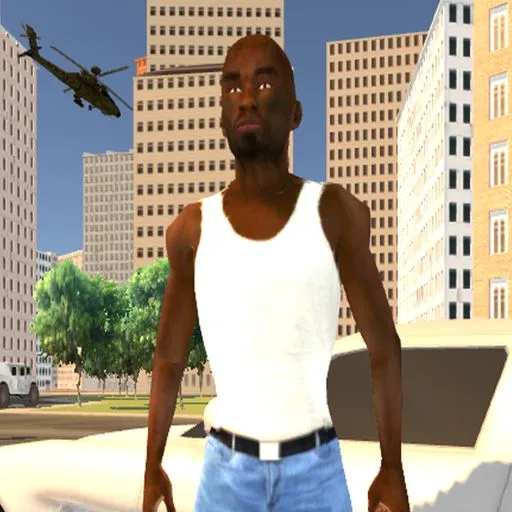
Grand Shift Auto: a 3D open city game with cars and missions
About Grand Shift Auto
Grand Shift Auto is a 3D action game set in a city, with open-world gameplay inspired by classic driving games. You roam the streets on foot or by vehicle, use weapons and complete missions.
The city is full of options: you can steal sports cars and speed through the streets, equip pistols, rifles, a shotgun and machine guns, and complete the three missions on offer. A weapon shop lets you change your arsenal, and at the airport a helicopter and an airplane are available. It runs in the browser on both PC and mobile, with no download or sign-up. If you want a car game with freedom to explore, try vehicles and move at your own pace, this one blends driving, action and exploration in a single session.
As a free-exploration game, there is no single way to play: you can follow the missions, spend your time trying every vehicle or simply roam the city to get to know it.
How to play Grand Shift Auto?
In Grand Shift Auto you explore the city on foot and in vehicles, choose weapons and progress through missions. You decide whether to drive a car, fly a helicopter or an airplane, or just walk the streets.
- Walk around the city with W, A, S and D and look around with the mouse.
- Walk up to a vehicle and press F to get in.
- Open the weapon shop with Tab to equip yourself and switch weapons with the mouse wheel.
- Complete the three missions the game offers.
- Visit the airport to try the helicopter and the airplane.
Grand Shift Auto controls
PC
- Move: W, A, S, D.
- Fire: left mouse button.
- Enter a vehicle: F.
- Change weapon: mouse wheel.
- Change camera: C.
- Weapon shop: Tab.
- Lock or unlock the cursor: L / Esc.
- Airplane: Space starts the engine; S gains altitude and W reduces it.
- Reload the game: R.
Mobile
- On-screen touch controls are available for moving, firing and driving; follow the in-game prompts.
Tips and tricks: Grand Shift Auto
- Try the camera with C to find the view that helps you drive best.
- Visit the weapon shop with Tab before starting a mission.
- With the cursor locked (L) your aim is better; press Esc when you need the menu.
- In the airplane, remember that S gains altitude and W reduces it, the opposite of what you might expect.
- If something goes wrong, press R to reload and try again.
- Practice takeoffs and landings calmly before attempting long flights.
Grand Shift Auto FAQ
How many missions does Grand Shift Auto have?
The game includes three missions and a weapon shop.
Can I fly a plane or a helicopter in Grand Shift Auto?
Yes, a helicopter and an airplane are available at the airport.
How do you get into a car in Grand Shift Auto?
Walk up to the vehicle and press the F key.
Additional information: Grand Shift Auto
Game type: 3D open-city action with driving
Technology: HTML5
Platform: Web browser (PC and mobile)
Enjoyed Grand Shift Auto? Also try Science Kombat, Vampire Survivors web or Momo Horror Game. Find more Action Games and hundreds of games on LudoRex.
🏷 Action Games, Shooting Games, Car Games
Last update:
Games like Grand Shift Auto
View all › Science Kombat
 Momo Horror Game
 Epic Pinball
 Prince of Persia
 Vampire Survivors
 World of Warships – Naval Warship Battle Game
 Sword Hunter
 Tanki Online
 Samurai Shodown
 Epic Hero Quest: Idle RPG
 A Dark Room
 Spanish Ark Survival Ascended Servers - Tharyon PVE and PVP Crossplay
 Murder
 Rainbow Friends Games: Survival
 Vortex 9
 Bomb It: Bomb Battle for 1 or 2 Players
 Granny Game: Granny Returns 3D
 Plants vs Zombies: Plants vs Zombies War