

 Español
 한국어
 Русский
 हिन्दी
 Português
 Türkçe
 Tiếng Việt
 Italiano
 Français
 日本語

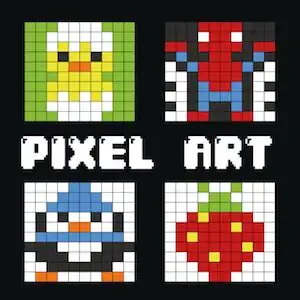
Pixel Art: Copy Pixelated Drawings on Your Grid
About Pixel Art
This pixel art turns the screen into a sheet of graph paper where each square is a pixel you have to paint. You pick a miniature model and your mission is to reproduce it at a larger size, square by square, until the drawing is identical. It's a calm, very visual activity, perfect for little ones, who discover how digital images are built from dots of color. If your kids or students like to paint, in our section of coloring games for kids they'll find many more activities.
The pixel drawings are made on a 10×10 grid, a size designed so children can finish each piece without getting overwhelmed. The models include animals, everyday objects and characters, so there's always one that appeals.
Video: Pixel Art: Copy Pixelated Drawings on Your Grid
How to play Pixel Art: Copy Pixelated Drawings on Your Grid: gameplay recorded on Ludorex.
How do you play Pixel Art?
The mechanics are simple and no reading is required. Each blank square has a small colored dot in the center that shows which shade belongs there, so the child only has to look, choose and paint.
- Choose the drawing you want to copy.
- Click a color on the left side palette.
- Click all the squares whose guide dot matches that color.
- Switch colors and repeat until the mosaic matches the model.
Pixel Art controls
PC
- Click on the palette: select color
- Click on a square: paint the pixel
Mobile and tablet
- Tap on the palette: select color
- Tap on a square: paint the pixel
What do you learn in Pixel Art?
- Color discrimination: telling similar shades apart and matching them correctly.
- Spatial orientation: transferring a small model onto a large grid while respecting rows and columns.
- Fine motor skills and hand-eye coordination by tapping each square precisely.
- Attention to detail and patience to complete the picture without mistakes.
- A first idea of how a digital image is made, the basis of computational thinking.
Recommended for ages 4 and up, both at home and in preschool and early primary classrooms.
Tips for playing better: Pixel Art
- Paint by color, not by position: select a shade and fill in all its squares before moving on to the next. That way you switch colors less often and make fewer mistakes.
- Start with the most repeated color (usually the background or the outline); the rest of the drawing takes shape right away.
- Go through the grid row by row, from left to right, so you don't miss a single stray pixel.
- With the little ones, name each color out loud together: the game also becomes a vocabulary review.
Pixel Art FAQ
What is pixel art?
It's a digital illustration technique in which the image is created by placing pixels one by one, like a mosaic. It's the style of classic video games and it's still very popular today.
Is this pixel drawing game suitable for kids who can't read yet?
Yes. Everything works with colors and the guide dot in each square, so no written instructions or prior knowledge are needed.
Can pixel art be played in the classroom?
Of course. On the interactive whiteboard, kids can take turns painting rows or work in pairs: one finds the color and the other applies it.
Additional information: Pixel Art
Game type: Educational pixel art, grid coloring
Recommended age: From age 4
Technology: HTML5
Platform: Web browser (PC, tablet and mobile)
Enjoyed Pixel Art? Also try Happy Color, online painting or Dinosaurs to Color Online. Find more Coloring Games and hundreds of free browser games on LudoRex.
🏷 Coloring Games, Educational Games for Kids Aged 4 to 5, Educational Games for Kids Aged 5 to 6, Educational Games for Kids
Last update:
Games like Pixel Art
View all › Happy Color: Paint by Number Game Online
 Dinosaurs to Color Online: paint and save
 Fish Coloring Pages Online: Paint the Ocean Floor
 Mandalas for Kids: Color Mandalas Online
 Robot Coloring Pages Online for Kids
 Multiplication coloring: secret mosaics
 Paintings to Paint: Create Modern Art Online
 Coloring pages for adults: paint online
 Addition Coloring up to 10: Secret Picture
 Addition and Subtraction Coloring: Online Mosaics
 Autumn Coloring Pages: 16 online drawings for kids
 Motorcycle Coloring Pages Online: Paint Your Bike
 Numbers 1 to 10 Coloring: identify and color
 Coloring for Kids: online drawings with a color palette
 Halloween Coloring: spooky online drawings
 Easter Eggs Coloring Online
 Ice Cream Coloring Pages: Paint Your Favorite Dessert
 Farm Coloring Page: Color Animals Online