

 Español
 한국어
 Русский
 हिन्दी
 Português
 Türkçe
 Tiếng Việt
 Italiano
 Français
 日本語

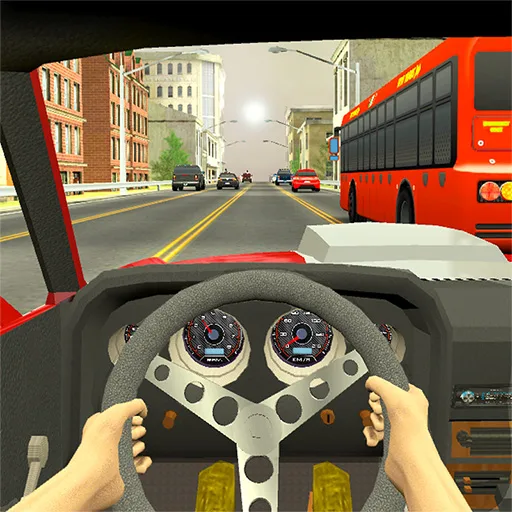
Racing in City: dodge the traffic and build your driving career
About Racing in City
Racing in City is a driving and racing game where you dodge traffic on busy city roads. Your goal is to complete the challenges on each track, earn points and spend them on new cars and upgrades.
The camera sits behind your car, so you see the road as if you were at the wheel. There are several city tracks and a long driving career: the more points you earn, the better the cars you can buy. It is a racing in city game made for the computer that runs right in your browser, with nothing to install.
What keeps it fun is the mix of reflexes and quick decisions: every track asks you to read the traffic, pick the right lane and take risks only when they pay off. The progression of purchases and upgrades also gives you a reason to retry challenges and beat your own record.
How to play Racing in City?
In Racing in City you drive through the city, weaving between cars and meeting the goal of each track. The basic steps are:
- Pick a track and start driving with the view from behind the car.
- Accelerate and change lanes to dodge traffic without crashing.
- Finish the track challenge to earn points.
- Cash in your points for new cars and upgrades.
- Move on to harder tracks to grow your driving career.
Racing in City controls
PC
- W or Up arrow: accelerate.
- S or Down arrow: brake.
- A / D or Left and Right arrows: steer the car.
- Shift: activate slow motion to get through tight spots.
Tips and tricks: Racing in City
- Trigger slow motion (Shift) just before a narrow gap between two cars, not once a crash is already unavoidable.
- Look a little further ahead than the car in front of you so you can pick a lane early.
- Upgrade your car before long tracks; a better vehicle gives you more margin for error.
- A short tap of the brake in a corner or traffic jam beats a sharp swerve.
Racing in City FAQ
How do I use slow motion in Racing in City?
Press the Shift key while driving. It gives you a moment longer to decide where to squeeze through traffic.
What are the points I earn used for?
Points can be exchanged for cars and upgrades, so each completed challenge brings you closer to a better vehicle.
Can I play Racing in City on my phone?
It is built for computers and uses keyboard controls, so PC is the best way to play.
Additional information: Racing in City
Game type: Car and driving game (traffic dodging)
Technology: HTML5
Platform: Web browser (PC)
Enjoyed Racing in City? Also try Drift Hunters, Drift Boss or Night City Racing. Find more Racing Games and hundreds of free browser games on LudoRex.
🏷 Racing Games, Car Games, Driving Games
Last update:
Games like Racing in City
View all › Drift Hunters
 Drift Boss
 Night City Racing
 Park Me
 Coach Bus Simulator
 Moto X3M: Online Motorbike Stunt Game
 Bike Race: Motorcycle Racing (Bike Racing)
 Bus Parking Simulator: a Bus Parking Game
 Two Punk Racing 2: 2 Player Car Games
 Monster Truck Soccer: football with giant trucks
 Traffic Jam 3D: Drive Through the Traffic Jam
 Flying Motorcycle: 3D Motorbike Flight Simulator
 Motorcycle Coloring Pages Online: Paint Your Bike
 Snow Rider: 3D Sled Race Through the Snow
 Formula Rush: online single-seater racing
 Aquapark io: water slide race
 Moto X3M 6 Spooky Land: Halloween Motorbikes
 NEW Fall Beans: colorful bean races where you must not be eliminated