

 Español
 한국어
 Русский
 हिन्दी
 Português
 Türkçe
 Tiếng Việt
 Italiano
 Français
 日本語

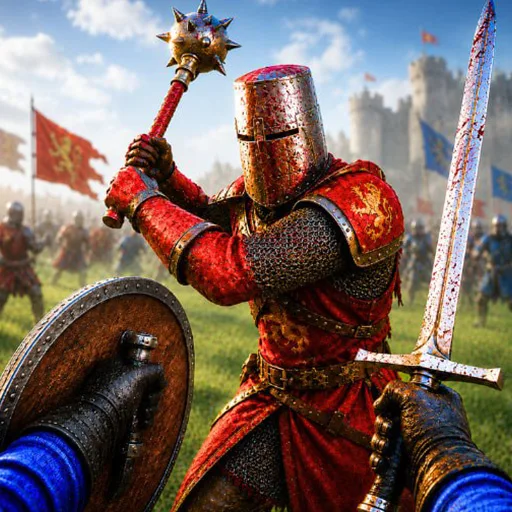
War The Knights: medieval battles with up to 200 warriors
About War The Knights
War The Knights is a 3D medieval battle game where you fight beside your allies in clashes of up to 200 warriors. You choose a faction, wield swords, spears, bows or crossbows, and your goal is to lead your army to victory.
The game mixes melee and ranged combat: you can block with a shield, throw weapons, use special abilities and lead cavalry charges. There are several different battlefields, so each match asks for a different strategy. It is a free war game that runs in your desktop browser with no download, and it is a good fit if you want medieval action with lots of fighters on screen. With so many warriors around you, positioning matters as much as aim: staying close to your allies, picking the right weapon for the distance and timing your abilities often decides who wins.
How to play War The Knights?
You join a large battle, choose a side and a weapon and fight alongside your army. Attack, defend with your shield and support your allies to tip the fight.
- Choose your faction and your main weapon: sword, spear, bow or crossbow.
- Advance with your army across the battlefield and spot the nearest enemies.
- Attack with the left mouse button and use the right button to guard with the shield or aim.
- Support your allies, use special abilities and lead cavalry charges to win the battle.
War The Knights controls
PC
- W, A, S, D: move. Shift: run. Z: crouch.
- Left mouse button: attack. Right mouse button: guard or aim. Middle mouse button: throw.
- 1 and 2: pick the main weapon. 3 and 4: pick gadgets.
- E: interact. R: cry. G: throw the melee weapon. F: kick. P: pause menu.
Tips and tricks: War The Knights
- Keep your shield up with the right button when several enemies close in at once.
- Bows and crossbows work best from the second line, behind your allies.
- Switch weapons with 1 and 2 depending on distance: spear to keep space, sword up close.
- Do not rush ahead alone: fighting with your army lowers the risk of being surrounded.
- Use the F kick to break the guard of a rival who defends too much.
War The Knights FAQ
How many warriors can fight in War The Knights?
Battles can gather up to 200 warriors at once, which gives a real large-scale medieval combat feel.
What weapons can you use in War The Knights?
You can use swords, spears, bows and crossbows, plus shields, throwing weapons and special abilities.
How do you throw a weapon in War The Knights?
Press the middle mouse button to throw, or G to throw your melee weapon. Gadgets are chosen with keys 3 and 4.
Additional information: War The Knights
Game type: 3D medieval battle game
Technology: HTML5
Platform: Web browser (PC)
Enjoyed War The Knights? Also try King Of Fighters Wing 1.91, Science Kombat or 1v1 LOL. Find more War Games and hundreds of games on LudoRex.
🏷 War Games, Action Games, Fighting Games
Last update:
Games like War The Knights
View all › Ships 3D: multiplayer ship simulator
 NEW Tank Stars: 2D tank battles against your friends
 NEW Age of War: war strategy across the ages
 X Trench Run: Spaceship Through the Trench
 King Of Fighters Wing 1.91
 Science Kombat
 1v1 LOL
 Momo Horror Game
 Golden Axe
 Epic Pinball
 Prince of Persia
 Vampire Survivors
 Treasure Arena
 World of Warships – Naval Warship Battle Game
 Sword Hunter
 Tanki Online
 Samurai Shodown
 Crown Guard