

 Español
 한국어
 Русский
 हिन्दी
 Português
 Türkçe
 Tiếng Việt
 Italiano
 Français
 日本語

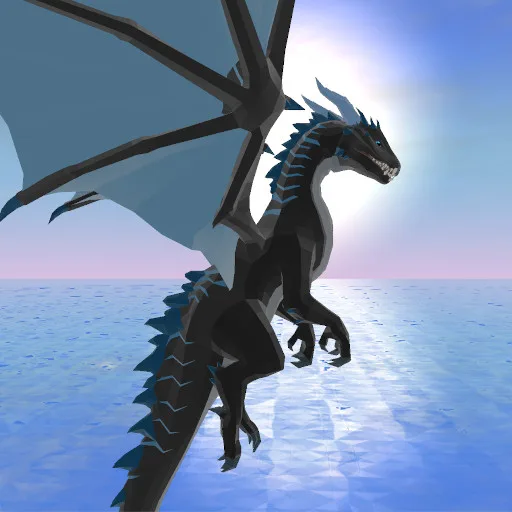
Dragon Simulator 3D: fly and fight as a giant dragon
About Dragon Simulator 3D
Dragon Simulator 3D is a 3D dragon life simulator. You control a giant dragon, pick its type of power and face humans and creatures while your dragon grows stronger and stronger.
You choose which dragon you will be and use the power of fire, ice, nature or air. With your dragon breath and huge tail you can break houses and fortifications and stand up to an entire town. The bravest humans will attack you, and tougher opponents such as golems, trolls and demons show up later. As the dragon grows up, it gains its own clan of dragons and a den. It is a dragon game that blends free flight, combat and progression in a 3D world, made for anyone who wants to feel like a fearsome creature for a good play session. It runs in the browser with no download and no sign-up, on both desktop and mobile. The long list of keyboard and mouse controls gives you plenty of room to master both flying and fighting.
How to play Dragon Simulator 3D?
In Dragon Simulator 3D you roam and fly across the world with your dragon, attack from range or up close, and grow it until it leads a clan.
- Choose the dragon you want to be and its type of power: fire, ice, nature or air.
- Move around the world, take off and fly over the town.
- Attack from a distance with your breath or up close with your tail to defeat enemies.
- Get stronger with every fight until you have your own clan and den.
Dragon Simulator 3D controls
PC
- W, A, S, D or arrow keys: move the dragon.
- Q: take off or land.
- Space bar: jump or fly up. C: fly down.
- Left mouse button: ranged attack. Right mouse button: melee attack.
- Shift: speed up. H: hide the interface. L: lock or unlock the cursor.
Mobile
- On mobile you play with the on-screen touch controls to move the dragon and attack.
Tips and tricks: Dragon Simulator 3D
- Learn the Q key early: taking off and landing smoothly lets you escape when there are too many enemies.
- Use the ranged attack against groups and the melee tail attack when foes get too close.
- Speed up with Shift to cross the map or leave a lost fight.
- Hide the interface with H if you want to enjoy the scenery or take clean screenshots.
- Pick the dragon type that suits your style: fire does not play the same as ice.
Dragon Simulator 3D FAQ
What dragon types can I choose?
You can pick the power of fire, ice, nature or air.
What enemies appear in Dragon Simulator 3D?
The bravest humans attack first, and tougher enemies such as golems, trolls and demons appear later.
How do I take off with the dragon?
On PC, press Q to take off or land, use the space bar to go up and C to go down.
Additional information: Dragon Simulator 3D
Game type: 3D open-world dragon simulator
Technology: HTML5
Platform: Web browser (PC and mobile)
Enjoyed Dragon Simulator 3D? Also try Supermarket Simulator, Toca Boca Games or play a drum online. Find more Simulation Games and hundreds of free online games on LudoRex.
🏷 Simulation Games, Action Games
Last update:
Games like Dragon Simulator 3D
View all › Supermarket Simulator
 Epic Pinball
 Toca Boca Games: Toca Life World
 The Mergest Kingdom
 Virtual Families Cook Off (Familias Virtuales)
 Avatar World Secrets: an Avatar World-Style Game
 Bus Parking Simulator: a Bus Parking Game
 Virtual Drums: Play the Drums Online
 Traffic Jam 3D: Drive Through the Traffic Jam
 3D House Building Games: Free Block Building
 Flying Motorcycle: 3D Motorbike Flight Simulator
 Ships 3D: multiplayer ship simulator
 Grindcraft: free online incremental crafting
 NEW Construct A Bridge: build a bridge and test if it holds
 NEW Tropical Merge: combine items and restore your island
 NEW Ice Fishing: ice fishing with realistic 3D graphics
 NEW Tiger Simulator 3D: live as a tiger in an open world
 NEW Teacher Simulator: mark exams and keep the class in line