

 Español
 한국어
 Русский
 हिन्दी
 Português
 Türkçe
 Tiếng Việt
 Italiano
 Français
 日本語

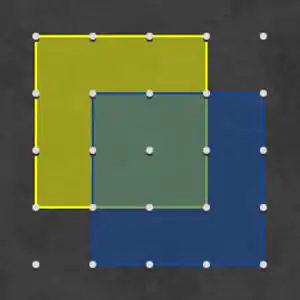
Virtual Geoboard: copy shapes on the 5x5 board
About Virtual Geoboard
The geoboard is a board with points arranged in a grid, on which you make shapes by joining those points with straight lines, as if they were rubber bands stretched between pegs. This virtual version recreates that classic classroom tool on a board of 5×5 points: a model shape appears on the right, and your challenge is to copy it exactly, with the same shape, size and color. It's an ideal activity for working on geometry hands-on, without needing a physical geoboard at home.
Its big advantage over paper is that you can try, make mistakes and fix them instantly, which encourages kids to experiment with squares, rectangles, triangles and irregular polygons.
Video: Virtual Geoboard: copy shapes on the 5x5 board
How to play Virtual Geoboard: copy shapes on the 5x5 board: gameplay recorded on Ludorex.
How do you play the virtual geoboard?
- Look at the model shape: count how many points each side covers.
- Click on the points of the board to draw the sides of the shape.
- Close the polygon by going back to the starting point.
- Check that the shape, position and color match the model to move on to the next challenge.
Virtual Geoboard controls
PC
- Mouse click on a point: mark a vertex and draw the line
Mobile and tablet
- Tap on a point: add a vertex to the shape
What do you learn in Virtual Geoboard?
- Recognize and build flat geometric shapes: squares, rectangles, triangles, trapezoids and L-shapes.
- Understand perimeter (counting the units along the edge) and area (counting the little squares inside).
- Get started with coordinates in the first quadrant by locating each point by its row and column.
- Improve spatial awareness, symmetry and attention to detail by copying a model.
Recommended from age 6; older kids can use it to calculate the area and perimeter of each shape.
Tips for playing better: Virtual Geoboard
- Count the spaces, not the points: a side that goes from the first to the third point measures 2 units, not 3. It's the most common mistake when copying shapes.
- First find a reference corner, for example the top left of the shape, and from there trace the outline clockwise.
- Use each shape to do some math: a 3 by 2 rectangle has an area of 6 units and a perimeter of 10. Asking your child to say it out loud turns the game into a complete exercise.
- Create your own challenges: after copying the model, ask your child to draw a different shape with the same area, or the mirror version of the one they just made.
Virtual Geoboard FAQ
What is a geoboard and what is it used for?
It's a teaching tool made up of a base with pegs or points in a grid. It's used to build shapes with rubber bands and discover geometry concepts such as sides, vertices, area, perimeter and symmetry in a hands-on way.
What shapes can you make on a 5×5 geoboard?
Lots of them: squares of different sizes (including ones tilted diagonally), rectangles, right and isosceles triangles, trapezoids, rhombuses and irregular letter-shaped polygons, like an L or a T.
Can I use this geoboard in class?
Yes. Projected on an interactive whiteboard, it works really well for the whole class to suggest how to copy the shape, and on tablets each student can work at their own pace.
Additional information: Virtual Geoboard
Game type: Educational math, hands-on geometry
Recommended age: From age 6
Technology: HTML5
Platform: Web browser (PC, tablet and mobile)
Enjoyed Virtual Geoboard? Also try greater than less than game, Multiples of 4 or 3D Geometric Shapes. Find more Math Games and hundreds of games on LudoRex.
🏷 Educational Games, Math Games, Educational Games for Kids Aged 6 to 7, Educational Games for Kids
Last update:
Games like Virtual Geoboard
View all › Greater or Less: A Game to Compare Quantities
 Multiples of 4: 4 Times Table Game in Reverse
 3D Geometric Shapes: Shape Change Race
 Addition for Kids: Simple Sums with Animals
 Cartesian Plane for Kids: Coordinates Game
 Multiples of 7: Times Table of 7 Game
 Multiples of 9: A Quiz to Review the 9 Times Table
 Multiples of 5: division practice with the 5 times table
 Multiples of 3: Times Table of 3 Quiz
 Multiples of 6: Division Table Game
 Multiples of 8: review the 8 times table by dividing
 Cuisenaire Rods Online: virtual manipulative
 Multiplication coloring: secret mosaics
 Multiples of 2: a quiz on doubles and division
 Wheel of Fortune online: chance and probability
 Tower of Hanoi online: logic puzzle with disks
 6 Times Table: True or False Game
 3-Digit Addition: With and Without Carrying