

 Español
 한국어
 Русский
 हिन्दी
 Português
 Türkçe
 Tiếng Việt
 Italiano
 Français
 日本語

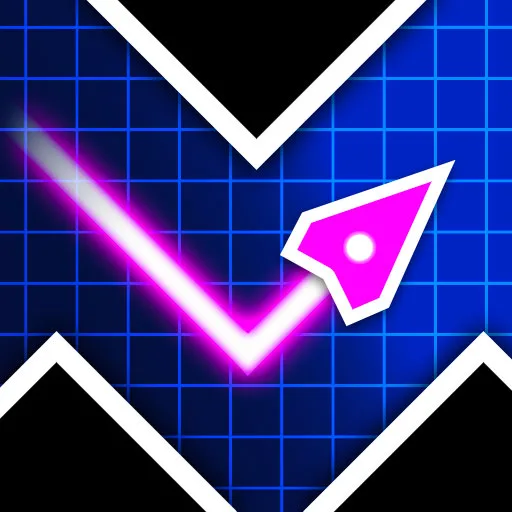
Geometry Vibes: fly your arrow through spikes and traps
About Geometry Vibes
Geometry Vibes is a reflex-based arcade game where you avoid obstacles, traps and spikes that come at you in waves. Your goal is to keep your arrow on the route and take it as far as possible without crashing.
The game includes a classic mode with levels, a race mode for 2, 3 or 4 players with several races in a row, and an endless mode to test yourself for as long as you last. Each mode changes the pace: alone you face the levels, and in a group you compete against your friends. It is free to play in your computer browser, with a single button.
How to play Geometry Vibes?
In Geometry Vibes your arrow moves forward on its own and you only decide whether it goes up or down. If you hold the button the arrow climbs; if you release it, it dives. With that single control you must pass through the obstacles, traps and spikes that keep appearing.
- Choose a game mode: classic with levels, a race for 2 to 4 players, or endless.
- Hold the left mouse button or the Up arrow to make the arrow fly up.
- Release to make it dive and dodge the spikes and traps.
- Alternate between climbing and diving to keep the arrow on the route.
- Go as far as you can, or win the race if you play with friends.
Geometry Vibes controls
PC
- Left mouse click or Up arrow (hold): fly up.
- Release the button: dive down.
- Extra players in the 2, 3 and 4 player modes: Up arrow, H and L.
Tips and tricks: Geometry Vibes
- Use short, rhythmic presses instead of holding the button too long, so you control your height better.
- Always look a little ahead of your arrow so you can decide in time whether to go up or down.
- In narrow corridors, smooth out your movement: sudden changes make you crash.
- In endless mode, look for a steady rhythm instead of changing strategy all the time.
- In race mode, do not get distracted by your rivals: focus on dodging and the lead will come.
Geometry Vibes FAQ
What modes does Geometry Vibes have?
It has a classic mode with levels, a race mode for 2, 3 or 4 players with multiple races, and an endless mode.
How do you control the arrow in Geometry Vibes?
You hold the left mouse click or the Up arrow to climb and release it to dive.
Which keys do the extra players use?
In the 2, 3 and 4 player modes, the other players use the Up arrow, the H key and the L key.
Additional information: Geometry Vibes
Game type: Arcade reflex and obstacle-dodging game
Technology: HTML5
Platform: Web browser (PC)
Enjoyed Geometry Vibes? Also try Pixel Speedrun, 3x3 Keyboard Escape or dinosaur game. Find more Agility, skill, and reflex games and hundreds of games you can play in your browser on LudoRex.
🏷 Agility, skill, and reflex games, Arcade Games, Multiplayer Games
Last update:
Games like Geometry Vibes
View all › Pixel Speedrun
 dinosaur game
 Keyboard Escape: +1 Speed Keyboard Escape
 Snake Game: Classic Snake Online
 Moto X3M: Online Motorbike Stunt Game
 3D Geometric Shapes: Shape Change Race
 Tunnel Rush: race through a 3D tunnel without falling
 Penalty Challenge: Online Penalty World Cup
 Core Ball: pin the balls without hitting each other
 Ping Pong Online: Play Solo or Against a Friend
 Slice Master: Cut Everything with the Bouncing Knife
 Tiny Fishing: Fishing Game with Upgrades
 Magic Tiles 3 Online: play the piano to the beat
 The World's Hardest Game: dodge and reach the goal
 Trap Adventure 2 Online: Furious Adventure 2
 Foot Chinko: pinball-style bouncing soccer
 Vex 4: stickman parkour with impossible jumps
 Wave Dash: Dodge Spikes to the Beat of the Music