

 Español
 한국어
 Русский
 हिन्दी
 Português
 Türkçe
 Tiếng Việt
 Italiano
 Français
 日本語

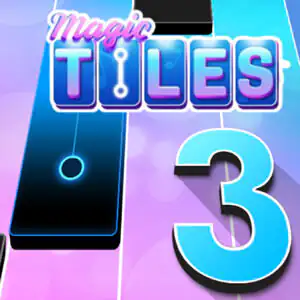
Magic Tiles 3 Online: play the piano to the beat
About Magic Tiles 3 Online
Magic Tiles 3 is a musical rhythm game in which the black piano keys fall down the screen and you have to tap them right on time to keep the song playing. If you miss a key or let one reach the bottom without pressing it, the music cuts out and the game ends. If you're looking for more challenges like this, take a look at our rhythm games.
What makes it so addictive is the mix of precision and a good ear: being fast isn't enough, you have to keep to the beat. The song selection includes well-known pop hits such as Dance Monkey, Counting Stars, Bad Romance or Sunflower, so it's easy to get hooked with a song you already know.
Games are short, which makes it an ideal pastime for a five-minute break, and each attempt asks you to improve your eye, ear and hand coordination a little. You don't need to know how to actually play the piano: just follow the rhythm.
How do you play Magic Tiles 3 in Magic Tiles 3 Online?
The screen is divided into vertical columns, like the keys of a piano seen from above. The dark tiles appear at the top and move down to the rhythm of the melody.
- Choose a song on the home screen.
- Tap the first black key to start the music.
- Keep pressing each key as it arrives, without touching the empty areas.
- On long keys, hold down until they end.
- Reach the end of the song to beat the challenge and get a better score.
Magic Tiles 3 Online controls
PC
- Left mouse click: tap the black keys
- Hold the click: hold the long keys
Mobile and tablet
- Tap: press each key; on a touchscreen you can use several fingers at once
Tips for playing better: Magic Tiles 3 Online
- Play with the sound on: hearing the song helps you anticipate when each note is coming.
- Look a little above the bottom of the screen to see the keys coming up, not just the one you're about to tap.
- On phone or tablet, use two fingers (one per half of the screen) when the song speeds up.
- Start with songs you know well; the rhythm will come naturally.
Magic Tiles 3 Online FAQ
Can you play Magic Tiles 3 online without downloading the app?
Yes. This version of Magic Tiles 3 online works in the browser, on both computer and phone, without installing anything.
Is it the same as Piano Tiles?
It belongs to the same type of game as Piano Tiles: tapping falling keys along with the music. Magic Tiles adds current songs and a visual style with neon lights.
What happens if I tap outside a key?
Tapping an empty area counts as a mistake and the song stops, so accuracy is as important as speed.
Additional information: Magic Tiles 3 Online
Game type: Musical rhythm / piano game
Technology: HTML5
Platform: Web browser (PC, tablet and mobile)
Enjoyed Magic Tiles 3 Online? Also try Pixel Speedrun, xylophone online or play a drum online. Find more Rhythm Games and hundreds of games you can play in your browser on LudoRex.
🏷 Agility, skill, and reflex games, Rhythm Games, Popular Games
Last update:
Games like Magic Tiles 3 Online
View all › Virtual Drums: Play the Drums Online
 Guess the Song: pop music trivia
 Online Xylophone: Play Melodies with Your Keyboard
 Wave Dash: Dodge Spikes to the Beat of the Music
 Piano Games 3: Tap the Black Keys in Time
 Play FNF: Rhythm Arrow Music Battle
 Pixel Speedrun
 dinosaur game
 Keyboard Escape: +1 Speed Keyboard Escape
 Snake Game: Classic Snake Online
 Moto X3M: Online Motorbike Stunt Game
 3D Geometric Shapes: Shape Change Race
 Tunnel Rush: race through a 3D tunnel without falling
 Penalty Challenge: Online Penalty World Cup
 Core Ball: pin the balls without hitting each other
 Ping Pong Online: Play Solo or Against a Friend
 Slice Master: Cut Everything with the Bouncing Knife
 Tiny Fishing: Fishing Game with Upgrades