

 Español
 한국어
 Русский
 हिन्दी
 Português
 Türkçe
 Tiếng Việt
 Italiano
 Français
 日本語

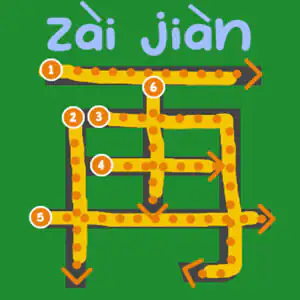
Handwriting Exercises Online: Letters and Numbers
About Handwriting Exercises Online
These handwriting exercises online turn stroke practice into a game: the child follows, with the mouse or a finger, a dotted line that shows the order and direction of each stroke correctly. It's an ideal complement to the classroom handwriting notebook and fits perfectly with our reading and writing games.
The handwriting activities are grouped into several sections: uppercase and lowercase letters of the alphabet in order, numbers from 1 to 10, geometric shapes (simple ones: circle, triangle, square), drawings of objects and animals, and a very original section with words in Chinese such as “goodbye” or “please”.
Because the strokes are guided, children get a clear pattern in every handwriting exercise and can repeat it as many times as they need, with no smudges or worn-out pages.
How do you play Handwriting Exercises in Handwriting Exercises Online?
- Choose the section you want to practice: letters, numbers, shapes, drawings or Chinese.
- Look at the number and the arrow that mark where each stroke begins.
- Trace along the dotted line without going outside it, following the direction shown.
- Complete all the strokes of the symbol and move on to the next one.
Handwriting Exercises Online controls
PC
- Mouse (click, hold and drag): trace over the dotted line
- Click: choose an exercise section
Mobile and tablet
- Finger or stylus: trace each letter, number or shape
What do you learn in Handwriting Exercises Online?
- The correct formation of uppercase and lowercase letters.
- The order and direction of strokes, key to legible, fluent handwriting.
- Tracing numbers from 1 to 10 and basic geometric figures.
- Precision, a steady hand and hand-eye coordination (graphomotor skills).
- A first interest in other writing systems, such as Chinese characters.
Recommended from age 4, especially in preschool and the first years of primary school.
Tips for playing better: Handwriting Exercises Online
- Go slowly: in handwriting, precision matters more than speed.
- Always follow the numbered starting point; starting from the wrong side creates bad habits when writing on paper.
- On a tablet, a stylus feels more like a pencil and helps make the jump from the game to the notebook.
- Pair each on-screen handwriting exercise with the same letter or number written by hand right afterwards: that way it sticks much better.
Handwriting Exercises Online FAQ
What handwriting exercises does the game include?
Uppercase and lowercase letters, numbers from 1 to 10, geometric shapes, drawings of objects and animals, and some Chinese words traced step by step.
Are these handwriting activities useful for school?
Yes, as reinforcement. They don't replace pencil and paper, but they help children internalize stroke order in a more motivating way.
Can they be done on a tablet or phone?
Yes. On a touchscreen you trace with your finger, which feels very natural for young children.
Additional information: Handwriting Exercises Online
Game type: Educational / writing and handwriting
Recommended age: From age 4
Technology: HTML5
Platform: Web browser (PC, tablet and mobile)
Enjoyed Handwriting Exercises Online? Also try Oxytone, Paroxytone, and Proparoxytone Words, Morse Code or Sort Alphabetically. Find more Reading and Writing Games and hundreds of free browser games on LudoRex.
🏷 Reading and Writing Games, Educational Games for Kids Aged 4 to 5, Educational Games for Kids Aged 5 to 6, Educational Games for Kids
Last update:
Games like Handwriting Exercises Online
View all › Oxytone, Paroxytone, and Proparoxytone Words: Sort Them
 Morse Code: Crack the Secret Word
 Sort Alphabetically: Alphabetical Order Game
 Syllable Game: Build Words for Kids
 Animal Crossword in Spanish for Kids
 Values Crossword online for kids
 Complete the Words: add the missing letter
 Prepositions of Place: quiz on above, below, inside
 English Spelling: School Supplies Words
 Fast Typing Keyboard Game: Motorcycle Race
 Egyptian Alphabet: Write with Hieroglyphs
 NEW Pic a Pix: Nonograms to Reveal Letters
 NEW Ojo de Lince: Find Objects by Reading in Spanish
 NEW Keyboard Letters: Learn Where Every Key Is
 NEW Find the Letters: Alphabet Game for Kids
 Keyboard Game for Kids: Defend the Beach by Typing
 Divide Words into Syllables: Online Game
 Multiplication Duck