

 Español
 한국어
한국어 Русский
 हिन्दी
 Português
 Türkçe
 Tiếng Việt
 Italiano
 Français
 日本語
日本語
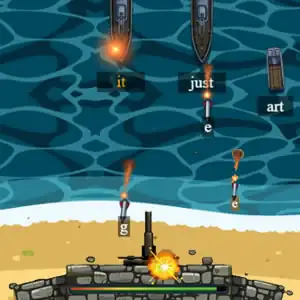
Keyboard Game for Kids: Defend the Beach by Typing
About Keyboard Game for Kids
This keyboard game for kids turns typing practice into a naval battle: a fleet of ships approaches the coast and the only way to stop it is to type on the keyboard the letters and words each one carries. Every correct keystroke fires your cannon, so the faster and more accurately you type, the sooner you'll sink the enemies. It's a very motivating way to work on keyboard skills for kids, because the little one doesn't feel like they're doing exercises, just defending their beach. If you're looking for more activities to practice typing on the computer, take a look at our typing games. Since the words appear in English (short words like it o just), it also reviews basic vocabulary in that language.
How do you play this keyboard game in Keyboard Game for Kids?
The ships come down the screen toward the sand, each with a word on top. To attack one, type that word letter by letter: every correct key launches a projectile. If a ship reaches the beach, your defense loses energy, and the game ends when the bar runs out.
- Find the ship that's closest to the coast.
- Type its word on the keyboard, letter by letter.
- Move on to the next target before it reaches the beach.
Keyboard Game for Kids controls
PC
- Letter keys: type the ships' words and fire
- Mouse: navigate the menus
We recommend playing on a computer with a physical keyboard, which is exactly what you want to practice.
What do you learn in Keyboard Game for Kids?
- Letter positions on the computer keyboard.
- Speed and accuracy when typing without looking at the keys so much.
- Attention and prioritization: deciding which ship to attack first.
- Basic English vocabulary and reading short words.
Recommended for ages 7 and up, when kids already recognize all the letters well.
Tips to Play Better: Keyboard Game for Kids
- Prioritize by distance: always attack the ship closest to the sand first, even if its word is longer.
- Place your hands correctly: resting your index fingers on the F and J keys helps you find the rest of the letters without searching.
- Accurate beats fast: at first it's more useful not to make mistakes than to type at full speed.
- Short, frequent sessions: for parents and teachers, 10 minutes a day works better than one long session once in a while.
Keyboard Game for Kids FAQ
Is it a good game for teaching kids to use the keyboard?
Yes. It makes kids find each letter on the keyboard under gentle, fun pressure, and repetition helps memorize the position of the keys.
Do you need to know English to play?
No. Just copy the letters that appear on screen; along the way, kids get familiar with simple English words.
Can it be played on a tablet?
The game is designed for practicing with a keyboard, so the ideal is a computer or a tablet with a connected keyboard.
Additional Information: Keyboard Game for Kids
Game type: Educational typing game
Recommended age: Ages 7 and up
Technology: HTML5
Platform: Web browser (PC)
Enjoyed Keyboard Game for Kids? Also try Multiplication Duck, Online typing test in 5 languages or Fast Typing Keyboard Game. Find more Typing Games and hundreds of free games on LudoRex.
🏷 English Games, Reading and Writing Games, Typing Games, Educational Games for Kids
Last update:
Games like Keyboard Game for Kids
View all › Online typing test in 5 languages
  Fast Typing Keyboard Game: Motorcycle Race
  NEW Type the Alphabet on the Keyboard
  Multiplication Duck
  PACMAN Multiplication Tables
  Physical Map of Spain: Interactive Relief
  Tangram Online: Geometric Shapes Puzzle
  Handwriting Exercises Online: Letters and Numbers
  Oxytone, Paroxytone, and Proparoxytone Words: Sort Them
  Map of the Autonomous Communities of Spain: game
  Morse Code: Crack the Secret Word
  Dinosaurs to Color Online: paint and save
  Pixel Art: Copy Pixelated Drawings on Your Grid
  Greater or Less: A Game to Compare Quantities
  Quizzland: General Knowledge Trivia
  Cartesian Plane for Kids: Coordinates Game
  Mazes for Kids: Follow Each Vehicle's Path
  Simon Says: Color and Sound Memory Game