

 Español
 한국어
 Русский
 हिन्दी
 Português
 Türkçe
 Tiếng Việt
 Italiano
 Français
 日本語

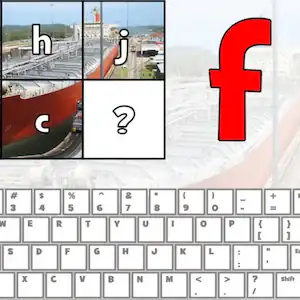
Keyboard Letters: Learn Where Every Key Is
About Keyboard Letters
With this keyboard letters game, little ones (and grown-ups just starting out with the computer) learn to find each key in a fun way. A big letter appears on screen and you have to press it on the computer keyboard or on the virtual keyboard shown below. Every correct answer uncovers a piece of a hidden photo, so there's an instant visual reward that encourages you to keep going. It's a very simple way to take your first steps before practicing typing more fluently; you can continue with our typing games.
How to Play Keyboard Letters?
- Look at the big letter that appears on the screen.
- Find it among the computer keyboard letters and press it.
- If you get it right, a square of the picture is revealed; if you miss, try again.
- Complete all the squares to see the whole photo.
Both vowels and consonantscome up, so by the end the whole alphabet gets reviewed. It's a short activity, perfect for five- or ten-minute sessions at home or in the computer lab. Parents and teachers will find it useful to help kids lose their fear of the computer and discover that the letters aren't in alphabetical order but spread out according to the keyboard layout. Repeating it several times makes the hands find each key on their own.
Keyboard Letters controls
PC
- Keyboard: press the letter shown
- Mouse: click the letter on the virtual keyboard
Mobile and tablet
- Touch: tap the letter on the on-screen keyboard
What Do You Learn in Keyboard Letters?
- Recognizing lowercase letters of the alphabet.
- Memorizing the QWERTY layout of the computer keyboard: letters and their position.
- Hand-eye coordination and response speed.
- First foundations of typing and computer use.
Recommended for ages 5 and up.
Tips for Playing Better: Keyboard Letters
- Play on the physical keyboard whenever you can: that's where the position of each letter really sticks.
- Encourage the child to rest their index fingers on the F and J keys (they have a small bump) and return there after every keystroke.
- At first, focus on getting it right before going fast; speed comes on its own.
- Ask which letter it is and how it sounds before pressing it to connect keyboard and reading.
Keyboard Letters FAQ
Is it good for learning the computer keyboard letters from scratch?
Yes. It shows only one letter at a time and doesn't penalize mistakes, so it's ideal for anyone who doesn't know the keyboard yet.
Can I play without a physical keyboard?
Yes, there's a virtual keyboard on screen that works with the mouse or with your finger on tablets and phones.
Does it tell uppercase from lowercase?
The letters appear in lowercase and you just press the matching key, with no need to use capitals.
Additional Information: Keyboard Letters
Game type: Educational, typing and alphabet
Recommended age: Ages 5 and up
Technology: HTML5
Platform: Web browser (PC, tablet and mobile)
Enjoyed Keyboard Letters? Also try Multiplication Duck, Online typing test in 5 languages or Fast Typing Keyboard Game. Find more Typing Games and hundreds of free online games on LudoRex.
🏷 Reading and Writing Games, Typing Games, Educational Games for Kids Aged 5 to 6, Educational Games for Kids
Last update:
Games like Keyboard Letters
View all › Online typing test in 5 languages
 Fast Typing Keyboard Game: Motorcycle Race
 NEW Type the Alphabet on the Keyboard
 NEW Number Words Crossword 1 to 20 in English
 NEW Letter Rain: Type Fast on the Keyboard
 NEW Keyboard Game for Kids: Defend the Beach by Typing
 Multiplication Duck
 PACMAN Multiplication Tables
 Physical Map of Spain: Interactive Relief
 Tangram Online: Geometric Shapes Puzzle
 Handwriting Exercises Online: Letters and Numbers
 Oxytone, Paroxytone, and Proparoxytone Words: Sort Them
 Map of the Autonomous Communities of Spain: game
 Morse Code: Crack the Secret Word
 Dinosaurs to Color Online: paint and save
 Pixel Art: Copy Pixelated Drawings on Your Grid
 Greater or Less: A Game to Compare Quantities
 Fish Coloring Pages Online: Paint the Ocean Floor