

 Español
 한국어
 Русский
 हिन्दी
 Português
 Türkçe
 Tiếng Việt
 Italiano
 Français
 日本語

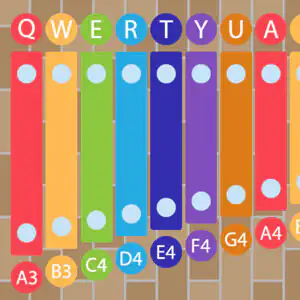
Online Xylophone: Play Melodies with Your Keyboard
About Online Xylophone
This This online xylophone is an instrument with colorful bars that really plays in your browser: each bar has its own note and you can play it with a click, with your finger or with a computer key. It works like a virtual xylophone (also known as online metallophone) designed so that kids and grown-ups can experiment with sounds without needing to know music. Above each bar is the key that plays it and below, the note name in letter notation with its octave (A3, B3, C4…). If you like creating sounds, in our section of music games you'll find more instruments and rhythm challenges.
How do you play Online Xylophone?
There are no points or time limits: it's a digital xylophone for free play. The fun is in exploring, listening and, little by little, playing simple melodies.
- Click or tap a bar to hear its note.
- Look at the key shown above: pressing it will play the same note.
- Go across the bars from left to right to hear the scale, from the lowest notes to the highest.
- Try stringing notes together to play a well-known song, like Happy Birthday or Twinkle, Twinkle, Little Star
Online Xylophone controls
PC
- Mouse click: play the bar
- Keys Q, W, E, R, T, Y, U, A…: play the note shown on each bar
Mobile and tablet
- Tap on the screen: make each bar sound
What do you learn in Online Xylophone?
- Auditory discrimination: telling low and high notes apart and recognizing the scale.
- Reading notes in letter notation: matching A, B, C, D, E, F and G with La, Si, Do, Re, Mi, Fa and Sol.
- Auditory and sequential memory: remembering the order of the notes in a melody.
- Hand-eye coordination: hitting the right bar or key in time with the music.
- Color-sound association: very useful with the youngest children, who can't read yet.
Recommended for ages 3 and up, with an adult alongside for the first sessions; it's also useful for primary school music teachers as a classroom resource.
Tips for playing better: Online Xylophone
- Play with the keyboard instead of the mouse: you'll be able to use several fingers and play melodies faster.
- With little ones, name the bars by their color (“now the green one”) before moving on to the note names.
- Write down the sequence of notes of a song on paper (for example, C4 C4 G4 G4…) and read it like a simple score.
- Play a guessing game: one person plays a few notes and the other tries to repeat them by ear.
Online Xylophone FAQ
Is the online xylophone with notes good for learning music?
Yes. By seeing the name of each note under its bar, children connect sound, color and notation, a very practical foundation before moving on to the recorder or keyboard.
What's the difference between a xylophone and a metallophone?
A traditional xylophone has wooden bars and a metallophone has metal ones, with a brighter, longer-lasting sound. In a virtual xylophone like this one, what matters is the tuning of the notes, which is the same in both cases.
Can I use this xylophone game on the interactive whiteboard?
Yes, it runs in the browser and responds to touch, so it's easy to project in class and have each student play a note.
Additional information: Online Xylophone
Game type: Educational virtual musical instrument
Recommended age: From age 3
Technology: HTML5
Platform: Web browser (PC, tablet and mobile)
Enjoyed Online Xylophone? Also try Multiplication Duck, PACMAN Multiplication Tables or Physical Map of Spain. Find more Educational Games for Kids and hundreds of games to play for free on LudoRex.
🏷 Rhythm Games, Educational Games for 3-Year-Olds, Educational Games for Kids Aged 4 to 5, Educational Games for Kids
Last update:
Games like Online Xylophone
View all ›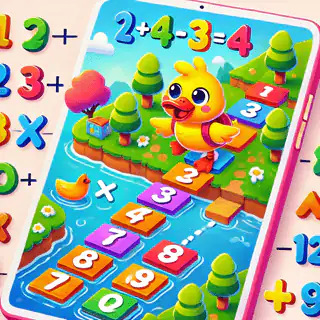 Multiplication Duck
 PACMAN Multiplication Tables
 Physical Map of Spain: Interactive Relief
 Tangram Online: Geometric Shapes Puzzle
 Handwriting Exercises Online: Letters and Numbers
 Map of the Autonomous Communities of Spain: game
 Morse Code: Crack the Secret Word
 Dinosaurs to Color Online: paint and save
 Pixel Art: Copy Pixelated Drawings on Your Grid
 Greater or Less: A Game to Compare Quantities
 Quizzland: General Knowledge Trivia
 Cartesian Plane for Kids: Coordinates Game
 Mazes for Kids: Follow Each Vehicle's Path
 Simon Says: Color and Sound Memory Game
 Online typing test in 5 languages
 English Alphabet: Letter Listening Game
 Rock, Paper, Scissors Online vs. the CPU
 Virtual Geoboard: copy shapes on the 5x5 board