

 Español
 한국어
 Русский
 हिन्दी
 Português
 Türkçe
 Tiếng Việt
 Italiano
 Français
 日本語

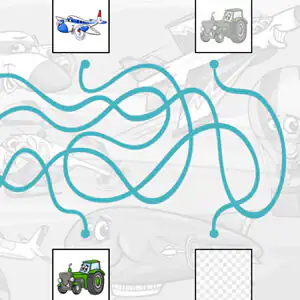
Mazes for Kids: Follow Each Vehicle's Path
About Mazes for Kids
These mazes for kids don't hide a single path between walls, but a tangle of colored lines that cross again and again. At the top there are several vehicles, like a plane, a tractor, a car or a motorbike, and each one has its own line. The challenge is to follow it with your eyes, without getting lost at the crossings, until you find out which box it ends in. If the little ones get hooked, our collection of maze games has many more routes to practice.
It's a maze game for kids that's very visual for little ones: there's no time limit and no text to read, so each child goes at their own pace and the reward comes as soon as they put the picture in place.
Video: Mazes for Kids: Follow Each Vehicle's Path
How to play Mazes for Kids: Follow Each Vehicle's Path: gameplay recorded on Ludorex.
How do you play Mazes for Kids?
Each line connects a vehicle at the top with a box at the bottom. Some boxes already show the picture and others are empty, waiting for someone to bring the right vehicle there.
- Choose one of the vehicles at the top.
- Follow its line with your eyes (or with your finger on the screen) through all the crossings.
- When you reach the end, drag the picture to the empty box where its path ends.
- Repeat with the rest of the vehicles until the board is complete.
Mazes for Kids controls
PC
- Click and drag with the mouse: move the vehicle to its destination
Mobile and tablet
- Tap and slide your finger: take the picture to its box
What do you learn in Mazes for Kids?
- Visual tracking: keeping your eyes on a specific line even when there are others around it, a key skill for learning to read later on.
- Attention and concentration sustained throughout the whole route.
- Figure-ground discrimination: separating one line from the rest of the lines and from the background drawing.
- Fine motor skills when dragging and dropping the picture precisely.
- Transport vocabulary: plane, tractor, car, motorbike… perfect for naming them out loud.
Recommended for ages 3 and up, so it works really well as a maze for kids aged 3 to 5 and as attention practice in the first years of primary school.
Tips for playing better: Mazes for Kids
- Put your finger or the cursor on the starting point and move slowly: at each crossing, the right line is the one that keeps going straight in the same direction, not the one that turns.
- If you get lost, try it backwards: start from the empty box at the bottom and go up the line until you see which vehicle appears.
- Solve the lines that already have their picture at the bottom first; they act as clues and rule out paths.
- Parents and teachers: ask the child to say out loud where each vehicle is going before dragging it. That way they also work on anticipation and language.
Mazes for Kids FAQ
What do mazes offer preschool children?
They train attention, patience and hand-eye coordination. In this crossed-lines format, children also practice visual tracking, which is closely linked to reading from left to right and from top to bottom.
Can this maze for kids be used on a tablet?
Yes. It works in your phone or tablet browser: just tap the vehicle and slide your finger to its destination, without installing anything.
Is it a good maze for kids aged 3 to 5?
Yes, because it doesn't require reading or counting and the pictures are big and easy to recognize. With 3-year-olds, it's best to sit with them the first few times and follow the line together with your finger.
Additional information: Mazes for Kids
Game type: Educational visual maze, path following
Recommended age: From age 3
Technology: HTML5
Platform: Web browser (PC, tablet and mobile)
Enjoyed Mazes for Kids? Also try Multiplication Duck, PACMAN Multiplication Tables or Physical Map of Spain. Find more Educational Games for Kids and hundreds of free games on LudoRex.
🏷 Educational Games for 3-Year-Olds, Educational Games for Kids Aged 4 to 5, Educational Games for Kids Aged 5 to 6, Educational Games for Kids
Last update:
Games like Mazes for Kids
View all › Multiplication Duck
 PACMAN Multiplication Tables
 Physical Map of Spain: Interactive Relief
 Tangram Online: Geometric Shapes Puzzle
 Handwriting Exercises Online: Letters and Numbers
 Map of the Autonomous Communities of Spain: game
 Morse Code: Crack the Secret Word
 Dinosaurs to Color Online: paint and save
 Pixel Art: Copy Pixelated Drawings on Your Grid
 Greater or Less: A Game to Compare Quantities
 Quizzland: General Knowledge Trivia
 Cartesian Plane for Kids: Coordinates Game
 Simon Says: Color and Sound Memory Game
 Online typing test in 5 languages
 English Alphabet: Letter Listening Game
 Rock, Paper, Scissors Online vs. the CPU
 Virtual Geoboard: copy shapes on the 5x5 board
 Living and Non-Living Things: a sorting game