

 Español
 한국어
 Русский
 हिन्दी
 Português
 Türkçe
 Tiếng Việt
 Italiano
 Français
 日本語

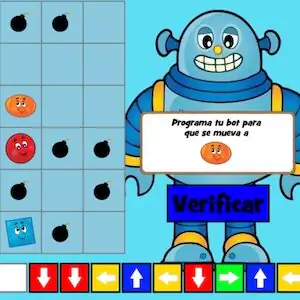
Coding for Kids: Guide the Robot
About Coding for Kids
This coding for kids turns the first coding concepts into a fun visual challenge. A robot needs to move across a grid to a specific shape, and the only way to get there is to give it the instructions in the right order. There's no need to write code or read much: everything is done with arrow keys. It's an ideal activity for home or the classroom and fits right in with our coding.
Video: Coding for Kids: Guide the Robot
How to play Coding for Kids: Guide the Robot: gameplay recorded on Ludorex.
How do you play Coding for Kids?
In each challenge the robot tells you which shape it has to reach. You choose the arrows one by one (up, down, left or right) and the robot stores them in its memory. When the sequence is complete, you press Check and the robot carries out the steps one after another. If the route is correct, it reaches its destination; if not, it's time to review the program.
- Look at where the robot is and which shape it has to reach.
- Plan a path in your head that avoids the bombs.
- Add the arrows in order, square by square.
- Press Check and see if the robot reaches the goal.
Coding for Kids controls
PC
- Click the arrows: add instructions to the program
- Click on Check: run the sequence
Mobile and tablet
- Tap on arrows and buttons: create and run the program
What do you learn in Coding for Kids?
- Computational thinking: breaking a problem down into small steps.
- Sequences: understanding that the order of instructions changes the result.
- Spatial orientation and laterality: telling left, right, up and down apart.
- Debugging: finding the step that fails and fixing it.
Recommended from age 5, especially beneficial between 5 and 7.
Tips for playing better: Coding for Kids
- Before touching any arrow, trace the path with your finger on the screen and count the squares out loud.
- Remember that the directions are the screen's, not the robot's: the left arrow always moves toward your left.
- If the robot fails, don't delete everything: go over the sequence step by step and look for the first wrong arrow.
- For teachers and families: drawing a grid on the floor and acting as the robot before playing really helps to understand the mechanics.
Coding for Kids FAQ
At what age can kids start with coding?
With visual games like this one, kids can start from age 5, because there's no need to write or memorize commands, just put arrows in order.
How does it relate to block-based programming languages?
It's the step before: here you work on the idea of sequence, which is later expanded in visual block languages with loops and conditions.
Is it useful as a coding for kids resource in class?
Yes. Games are short, work on interactive whiteboards or tablets, and let the group discuss why one route works and another doesn't.
Additional information: Coding for Kids
Game type: Educational coding and logic
Recommended age: Ages 5 to 7
Technology: HTML5
Platform: Web browser (PC, tablet and mobile)
Enjoyed Coding for Kids? Also try Multiplication Duck, PACMAN Multiplication Tables or Physical Map of Spain. Find more Educational Games for Kids and hundreds of free games online on LudoRex.
🏷 Educational Games, Educational Games for Kids Aged 5 to 6, Educational Games for Kids Aged 6 to 7, Educational Games for Kids
Last update:
Games like Coding for Kids
View all › Multiplication Duck
 PACMAN Multiplication Tables
 Physical Map of Spain: Interactive Relief
 Tangram Online: Geometric Shapes Puzzle
 Handwriting Exercises Online: Letters and Numbers
 Map of the Autonomous Communities of Spain: game
 Morse Code: Crack the Secret Word
 Dinosaurs to Color Online: paint and save
 Pixel Art: Copy Pixelated Drawings on Your Grid
 Greater or Less: A Game to Compare Quantities
 Quizzland: General Knowledge Trivia
 Cartesian Plane for Kids: Coordinates Game
 Mazes for Kids: Follow Each Vehicle's Path
 Simon Says: Color and Sound Memory Game
 Online typing test in 5 languages
 English Alphabet: Letter Listening Game
 Rock, Paper, Scissors Online vs. the CPU
 Virtual Geoboard: copy shapes on the 5x5 board