

 Español
 한국어
 Русский
 हिन्दी
 Português
 Türkçe
 Tiếng Việt
 Italiano
 Français
 日本語

Kids Piano: Virtual Piano with Animal Sounds
About Kids Piano
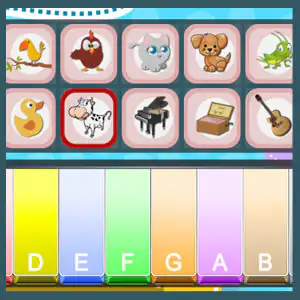
This piano for kids is a virtual piano designed for little ones: each key has its own color and has the name of the note written on it, from DO to SI (C to B), along with its letter in letter notation (C, D, E, F, G, A, B). There are no sharps or flats, so the keyboard is clean and easy to explore without anyone explaining anything. The most fun part is at the top: a row of buttons to change the piano's sound to that of a dog, a cat, a hen, a vaca or other animals, or instruments like the guitar or the music box. If you're looking for more keyboard activities, in the piano games you have more options.
Video: Kids Piano: Virtual Piano with Animal Sounds
How to play Kids Piano: Virtual Piano with Animal Sounds: gameplay recorded on Ludorex.
How do you play the piano for kids in Kids Piano?
There are no points, timer or mistakes: it's a free-play game to experiment with music.
- Choose a sound from the row of buttons at the top: an animal or an instrument.
- Press the colored keys to hear each note.
- Try playing scales going up and down, or make up a simple melody.
- Change the sound and repeat the same song to compare how it sounds.
Kids Piano controls
PC
- Mouse (click): play a key or choose the sound
- Keys A, S, D, F, G, H, J and K: play the piano notes with the computer keyboard
Mobile and tablet
- Screen tap: press the colored keys and the sound buttons
What do you learn in Kids Piano?
- Recognize the names of the musical notes and their order in the scale.
- Matching each note with its letter in letter notation, useful for reading chords later on.
- Telling apart low and high sounds and recognizing the timbre of different instruments and animals.
- Developing hand-eye coordination and auditory memory by repeating melodies.
Recommended from age 3; kids aged 6 to 10 can use it to practice simple songs with the computer keyboard.
Tips for playing better: Kids Piano
- For parents and teachers: start with songs that have few notes, like “Twinkle, Twinkle, Little Star”, which is played using only the first notes of the scale.
- Use the colors as a support: you can write a song as a sequence of colors on paper so the child can follow it without being able to read sheet music.
- With the computer keyboard, rest your fingers on the A-S-D-F-G-H-J-K row and play without looking at the screen: that's how you train your ear.
- Play a guessing game: one person plays a note without the other looking, and the other tries to say which one it was.
Kids Piano FAQ
What age is this piano for kids for?
The youngest, from age 3, can enjoy pressing keys and hearing animals. For ages 6 to 8 and 8 to 10, it's useful for learning the names of the notes and playing their first melodies.
Can you play the virtual piano with the computer keyboard?
Yes. The A, S, D, F, G, H, J and K keys on the middle row of the keyboard play the notes, and you can also use the mouse or the touchscreen.
Do you need to know music to use it?
No. Each key shows its note and its letter, so it's actually made for starting from scratch.
Additional information: Kids Piano
Game type: Educational, music, virtual piano
Recommended age: From age 3
Technology: HTML5
Platform: Web browser (PC, tablet and mobile)
Enjoyed Kids Piano? Also try Multiplication Duck, PACMAN Multiplication Tables or Physical Map of Spain. Find more Educational Games for Kids and hundreds of free games on LudoRex.
🏷 Educational Games for 3-Year-Olds, Educational Games for Kids Aged 4 to 5, Educational Games for Kids Aged 5 to 6, Educational Games for Kids
Last update:
Games like Kids Piano
View all › Multiplication Duck
 PACMAN Multiplication Tables
 Physical Map of Spain: Interactive Relief
 Tangram Online: Geometric Shapes Puzzle
 Handwriting Exercises Online: Letters and Numbers
 Map of the Autonomous Communities of Spain: game
 Morse Code: Crack the Secret Word
 Dinosaurs to Color Online: paint and save
 Pixel Art: Copy Pixelated Drawings on Your Grid
 Greater or Less: A Game to Compare Quantities
 Quizzland: General Knowledge Trivia
 Cartesian Plane for Kids: Coordinates Game
 Mazes for Kids: Follow Each Vehicle's Path
 Simon Says: Color and Sound Memory Game
 Online typing test in 5 languages
 English Alphabet: Letter Listening Game
 Rock, Paper, Scissors Online vs. the CPU
 Virtual Geoboard: copy shapes on the 5x5 board